AI Try On
Dress Any Model in Your Clothing
Turn a flat clothing photo into on-model images without a photoshoot. Upload your garment, pick one of our sample models or upload your own, and this AI fashion model generator dresses the model in your outfit for a realistic, catalog-ready shot.
AI Fitting Room: Virtually Try On Clothes on Your Models
Eliminate Photoshoot Costs with AI Models
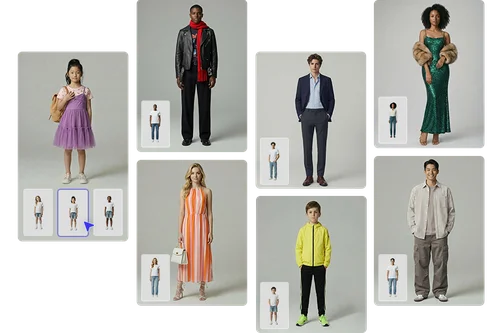
Skip the studio, models, and scheduling. Upload your clothing photo, choose a built-in sample model or your own, and the AI detects body shape and applies a realistic fit. You get high-quality on-model images that stand out on marketplaces and social media, produced in minutes instead of days.
Boost E-commerce Conversions Across Every Body Type
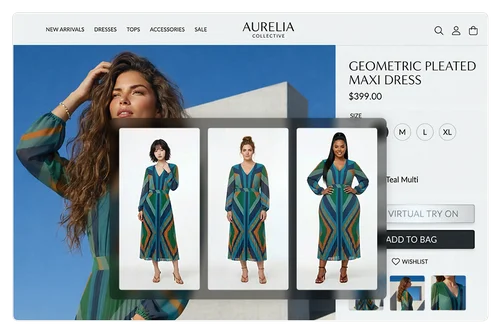
Show your clothing on models of every size, age, and style. AI Try On produces natural, true-to-life fits with realistic fabric detail across body types, giving shoppers a clearer picture of how a garment sits. Generate inclusive, ready-to-use visuals for social media and e-commerce to broaden your brand's reach.
Automate Apparel Catalog Creation at Scale
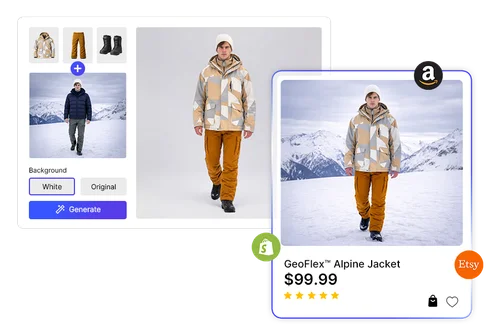
Build a full catalog of on-model shots without booking a shoot. The AI maps tops, bottoms, dresses, and shoes onto each model with accurate drape and realistic texture. Customize the background and export ready-to-use images sized for any e-commerce apparel platform.
How to Put Your Clothing on AI Models
Choose Your Mode and Upload Clothing Photos
Select your generation mode: one model with multiple outfits, or one outfit across multiple models. Upload clear, high-resolution photos of your clothing items to begin.
Select Your Garments and Models
Choose the garments and models based on your selected mode. AI Try On gives you full control to create any outfit and model combination.
Generate and Download Your Images
Click “Generate” to create your full batch of images, then download them all at once. Each image is ready for product listings, marketing campaigns, or social media.
The Benefits of AI Try On
Put tops, bottoms, dresses, full outfits, and shoes on your model with one upload. Restyle the same model as many times as you need, with no new shoot required.
The AI reads posture, body contours, and proportions so clothing folds, drapes, and fits naturally. This isn't a flat overlay. It shows how a garment actually sits on the body.
Skip photoshoots, studio rentals, and model sessions. Generate professional on-model images in minutes and put your photography budget toward other work.
Eliminate one-by-one generation. Use multi-outfit and multi-model workflows to create a complete batch in a single session. Deliver consistent, studio-quality visuals ready for e-commerce, marketing, and social media.
No model photos required. Choose a built-in sample model covering a range of body types and ages, or upload your own brand model to keep every image on-brand.
Upload your clothing and model, choose a background, and generate. No downloads, plugins, or design skills required.
Online AI Try On FAQ
What is AI Try On?
AI Try On is an AI fashion model generator for apparel brands. It dresses a model in your clothing to create realistic, on-model images for product listings, marketplaces, and social campaigns.
Is AI Try On for shoppers or for brands?
It's built for brands and sellers. AI Try On generates on-model product images you can publish, rather than letting a shopper try clothes on their own selfie. Use it for catalog shots, marketplace listings, and social campaigns.
Is AI Try On free to use?
Each generated image costs 6 credits, the same for free and paid users. Free accounts get daily credits to start, and subscription plans give you a larger credit balance for higher-volume work. No features are locked behind the paywall.
How do I put my clothes on an AI model?
Upload your clothing (a single garment, or a top, bottom, and shoes), choose a sample model or upload your own, then click Generate. Download your realistic, ready-to-use on-model images.
Can I put a full outfit on one model?
Yes. Upload a single garment, or add a separate top, bottom, and shoes to dress the model in a complete outfit in one generation.
Is it safe to use AI Try On?
Yes. Your product images and model photos are encrypted in transit and processed with strong security measures.
Can I use AI Try On for commercial projects?
Yes. Generate professional, ready-to-use images for e-commerce, social media, and marketing campaigns with full commercial usage rights.
How is AI Try On different from AI Product Modeling?
AI Try On dresses a model in a specific garment you upload, with a focus on apparel fit and drape. AI Product Modeling places any product on a model for lifestyle-style showcase shots. Use AI Try On for clothing, and AI Product Modeling for broader product photography.
Can I apply one outfit to multiple models at the same time?
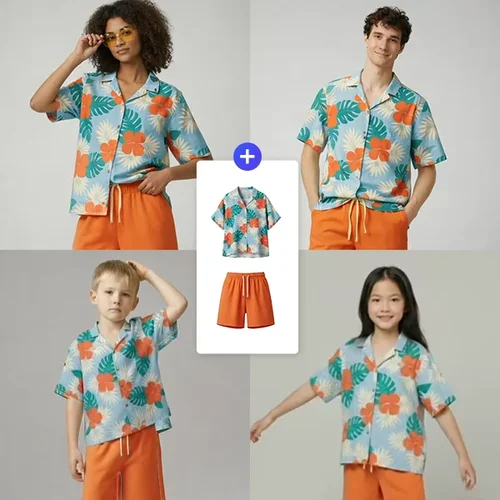
Yes. With the "One outfit set displayed on models" mode, select multiple sample or custom models and generate all try-on visuals in one batch. Each model produces an independent, downloadable result.
Can I test multiple outfits on one model in a single session?
Yes. Choose "Multiple outfit sets displayed on one model," upload several clothing images, and generate results for all outfits at once. This workflow is ideal for catalog production, ensuring consistent model presentation across your full product range.