AI Product Background Generator
Product Photos Without the Photoshoot
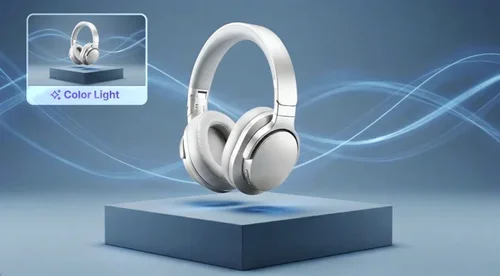
Upload a plain product shot and pick a scene. AI builds the background, light, and shadow around your product, so the result reads as a photo, not a cutout. The product itself isn't redrawn, so its label and packaging still match what you ship.
AI Product Photography for Listings, Campaigns, and Social

One Product, Ready for Every Marketplace
Shot it on a bedsheet at home? Swap in a bright studio set, a marble surface for a premium feel, or a lifestyle scene. One photo becomes listing images for your Shopify store, Etsy shop, and Amazon gallery, each with a product photo background that suits where it's going.
A New Season Without a New Shoot
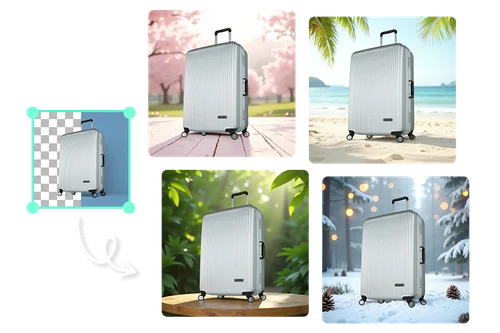
Holiday gift guides, summer sales, back-to-school: each campaign wants a fresh look. Pick a seasonal style or describe the scene in a prompt, and the product photo you already have is ready for the next promo.

The Right Background for Any Product You Sell
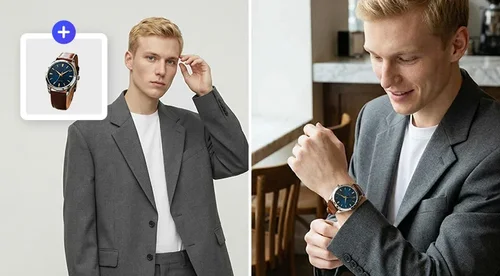
From sneakers and sunglasses to cookware and electronics, generate a background that fits the product. Choose studio, lifestyle, and seasonal styles so a plain shot turns into a polished image, ready to drop into your storefront, promos, and ads. Whatever your catalog looks like, every product gets a professional setting.

Product Shots That Fit the Feed
On Instagram or TikTok, a plain studio shot looks like an ad. Put the same product on a kitchen counter, a desk, or a beach towel so it sits naturally in the feed, for organic posts and paid social alike.
How to Create AI Product Photos
Upload Your Product Image
Import your product photo from your device. JPG, PNG, GIF, WebP, and BMP files up to 50 MB all work.
Choose How to Generate
Pick a ready-made preset, let Smart Match build a scene around your product, blend it into your own image with From Image, or describe the background with a text prompt.
Generate, Compare, and Download
Each run gives you four background options. Pick the best fit for your listing and download it with no watermark, ready for your storefront or ad.
Why Sellers Use AI Product Background

Skip the studio, the lighting kit, and the photographer. Upload a photo you already have and generate a professional background in minutes. For a growing catalog, that means a far lower cost per product and much faster launches.
Apply the same background style to every product so your store looks like one coherent brand, not a mix of random shots. A consistent, professional set of images builds trust with shoppers and makes your listings and ads feel like they belong together.
Swap a cluttered background for a clean setting, and shoppers see the product's details first. That matters on a results page full of competing listings.
The AI works on the scene, not the item. Your product comes from your own photo, so labels, logos, and packaging text stay readable and true to what shoppers will receive.
No two products need the same setting. Pick a ready-made template for a fast result, or take full control with Smart Match, From Image, and From Text to match your exact brand style. You are never stuck with a generic background.
Every run gives you four options instead of one, so you can compare and choose the strongest image for each listing. Download the winner with no watermark, ready to go straight to your store or ad.
AI Product Background FAQs
What is AI product photography?
AI product photography means creating product photos with AI from a picture you already have, instead of booking a studio shoot. In MyEdit Business, AI Product Background Generator handles the scene: upload a product shot, and it builds a new background with matching light and shadow around your product.
What is AI Product Background Generator?
AI Product Background Generator is MyEdit Business's AI tool for e-commerce product photography. It replaces the background of a product photo with a clean, professional one, so sellers can create listing-ready images without a studio or a photographer.
Does this generate a new product, or keep mine?
It keeps yours. AI Product Background Generator works from your own product photo and builds a new scene around it, so the product isn't redrawn and labels and packaging stay readable. If you want AI to render a product from scratch in an entirely new scene, and you're fine with the details being reinterpreted, use AI Image Generator with a reference image instead.
Can AI product photography replace a studio shoot?
For most listing images, ads, and social posts, yes. You get consistent, realistic backgrounds without booking a studio. For hero campaign images, or glass, jewelry, and other reflective products, a traditional shoot may still be worth it.
What background do Amazon product photos need?
Amazon's main product image requires a pure white background (RGB 255, 255, 255), with the product filling most of the frame and no extra text or props. AI Product Background builds a scene with natural light and shadow, so for a true, even white use the Background Removal tool on your main image. Then use AI Product Background for your styled, secondary, and lifestyle shots.
Can I use the images for commercial and marketplace listings?
Yes. Images you create are made for business use, including product listings on major marketplaces like Amazon, Etsy, eBay, and Walmart, your own online store, and your ads and social posts. See the Terms of Service for details.
How is this different from a consumer background changer?
It is built for selling, not one-off edits. You get four ways to generate a background (a ready-made template, Smart Match, From Image, or From Text), four options per run, and watermark-free images you can use commercially on any marketplace.
What image formats does it support?
It accepts JPG, PNG, GIF, WebP, and BMP files up to 50 MB as input, and provides JPG as the output format.
Is it safe to use?
Yes. Images are encrypted in transit and deleted after processing, and your files are not shared.
Is AI Product Background free?
You can use the bonus Credits you claim each day, or monthly bonus Credits for premium users. Each generation creates four background options and uses four Credits, and downloads have no watermark. See Credits for details.